gfxCardStatus for Mac
1.8.1
- User
-
- 6.3
- Not bad
- 10
- Softonic
-
- 8
- Very good
- Very good
- Your rating:
Your rating has been saved
Oops, something's gone wrong. Try again.
- License:
- Free
- Language:
- English
- OS::
-
- Mac
- Latest version:
- 1.8.1
- Last month's downloads:
- 139
- Size:
- 594 KB
- Developer:
- Cody Krieger
gfxCardStatus is fully compatible with:
- Mac OS X
You'll also need:
| Others: | Mac OS X 10.6 |
|---|
gfxCardStatus is also compatible with
- Mac OS X
Report this software
Thank you! Your feedback will help us make software better for all of us.
Oops, something's gone wrong. Try again.
Versions of gfxCardStatus
| Version | License | Language | O.S. |
|---|---|---|---|
| gfxCardStatus 1.8.1 25/08/10 | Free | English |
|
Apps & Games content ratings on Softonic
Content ratings help you understand the type of content you might find in an app or game, so you can decide if they are suitable for you and your family.
What do the ratings actually tell me?
Content ratings describe the minimum age we feel the content is suitable for. It does not indicate that the app was specifically designed for that particular age, or if a certain level of skill is required to play the game or use the app.
Where can I find the content ratings?
You will find the content ratings on every app or game page.
Why are some apps or games unrated?
If an app or game does not have a rating, it means that it has not yet been rated, or it’s been rated and we’re working to update the page.
Rating Systems
Softonic uses the rating systems by PEGI and ESRB. The ratings you see may vary by country or region.
Articles gfxCardStatus
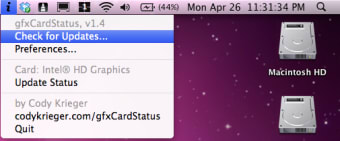
MacBook Pros with nVidia graphics cards are great for gaming but the power hungry graphics cards drain your battery when not in use. gfxCardStatus allows you to choose the which chipset you want to remain active so that you can extend battery life and maximize power manually.
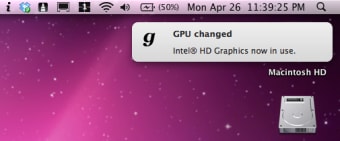
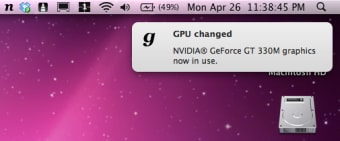
gfxCardStatus places a small icon in the menu bar and displays a small n for nVidia or i for the currently active Intel graphics chip set. Just use your mouse to switch manually between the two when needed. If you disable the nVidia card permanently, you will should notice an increase in your battery life.
It's a shame gfxCardStatus doesn't detect automatically when to activate your nVidia graphics card but nevertheless, it gives you the possibility to extend your battery life manually.
- Easy to use
- Saves battery power
- Requires activating manually
Top Downloads: Analyzers & Optimizers
Top Downloads
-
CrossOver Mac
Run Windows programs on your Mac
- Memory Clean
- iStat Nano
- Lion Disk Maker
- Geekbench
Articles gfxCardStatus
-
Best cloud photo storage
by Softonic Editorial Team
Find out the best way to back up your photos. Choose the best online photo storage app for your needs!... See more
-
Essential Mac utilities for Usenet downloads
by Tom Clarke
Despite the amount of time they've been around, Usenet newsgroups remain relatively unknown to the... See more
Discover alternatives to and add-ons for gfxCardStatus
Alternatives to gfxCardStatus
-
CrossOver Mac Trial version
Run Windows programs on your Mac
-
Macaroni Trial version
Automated system maintenance
-
Softonic's
Choice
OnyX Free
Comprehensive maintenance for your Mac
Addons for gfxCardStatus
- gfxCardStatus doesn’t have any addons yet. Would you recommend any to us? Tell us
Do you want to be a part of our community?